4 「公開プロトコル」の「NFS」にチェックマークを付け、[OK]をクリックします。
公開プロトコル:
SMB
AFP
FTP
バックアップ
SFTP
Webアクセス
NFS

NFSパス
メモ: 公開するNFS公開パスをメモします。NFSクライアントからアクセスする際に必要です。
5 [閉じる]をクリックします。
6
「NFS」の横にあるスイッチ(
 )をクリックし、表示を
 にします。
にします。

A horizontal row for the NFS service. It includes an NFS icon, the text "NFS", a blue toggle switch in the "on" position, and a gear icon for settings.
7
「NFS」の横にある設定アイコン(
 )をクリックします。

A horizontal row for the NFS service, identical to the previous one, but with the gear icon highlighted to indicate it should be clicked.
8 [サービス]タブで、[編集]をクリックします。
IPアドレスでアクセスを制限しないときは、手順10に進んでください。
NFS情報
サービス クライアント設定 NFSルール
公開ネットワークアドレス: 0.0.0.0
公開サブネットマスク: 0.0.0.0
編集
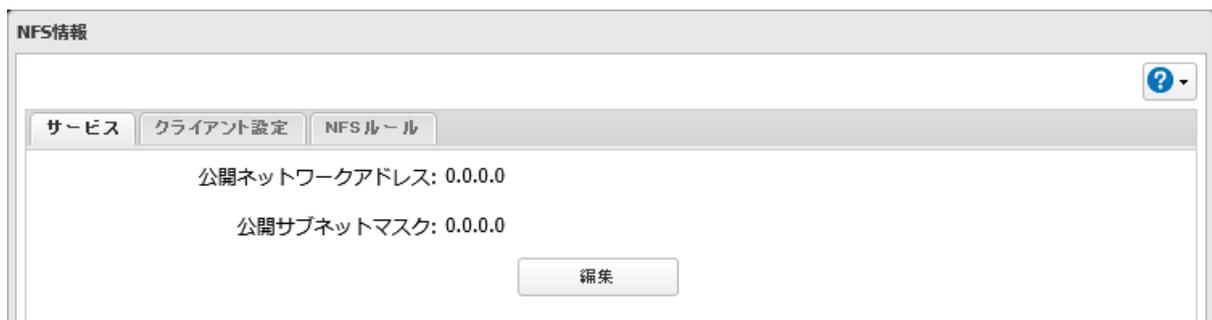
A dialog box titled "NFS情報". It has three tabs: "サービス" (active), "クライアント設定", and "NFSルール". The "サービス" tab displays "公開ネットワークアドレス: 0.0.0.0" and "公開サブネットマスク: 0.0.0.0". At the bottom center is an "編集" (Edit) button. There is a help icon in the top right corner.