フェイルオーバーを設定する
フェイルオーバーを設定するには、以下の手順を行ってください。
メモ: 設定・データ移行機能が実行中のTeraStationは、バックアップ機には設定しないでください。
1 メイン機の設定画面で「バックアップ」をクリックします。

A dark grey rectangular button with a white icon of two overlapping rectangles on the left and the text "バックアップ" in white.
2 「フェイルオーバー」の横にある設定アイコン(
Image: 設定アイコン
)をクリックします。
A horizontal bar showing "フェイルオーバー" with a blue square icon on the left and a gear icon on the right, followed by the text "スタンドアロン機".
3 「フェイルオーバーを設定する」をクリックします。
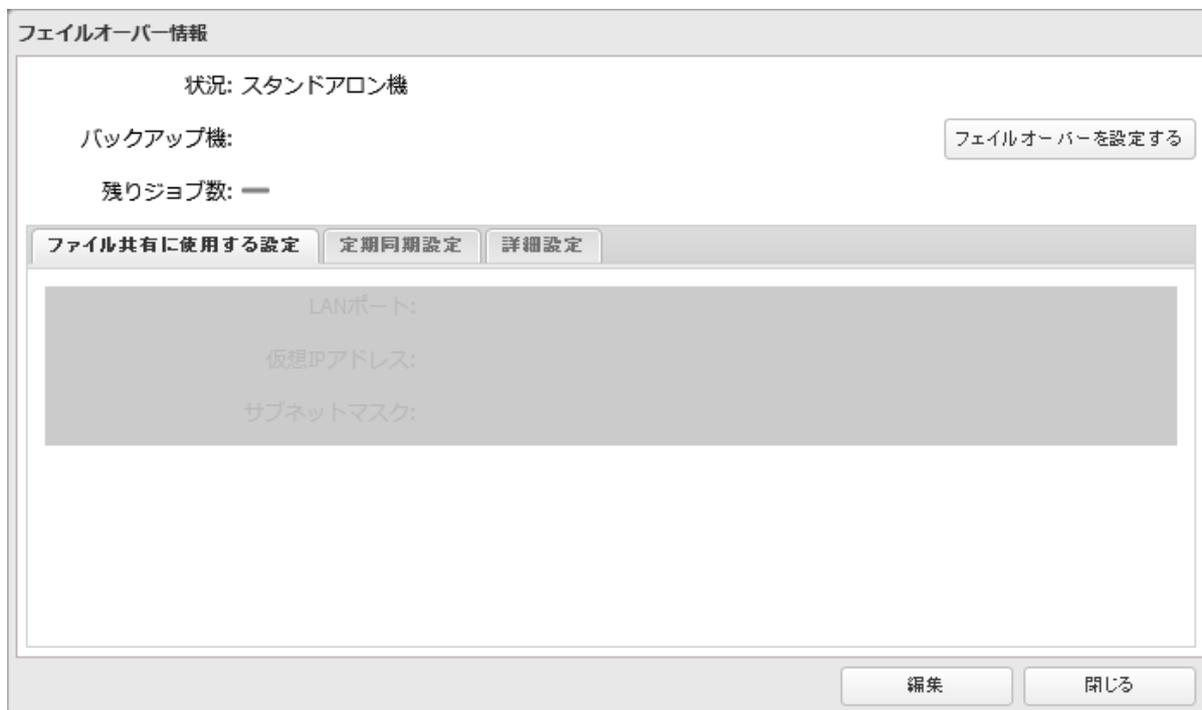
A "フェイルオーバー情報" (Failover Information) dialog box. It shows the status as "スタンドアロン機" (Standalone machine). There are fields for "バックアップ機:" (Backup machine) and "残りジョブ数: —" (Remaining jobs: —). A button "フェイルオーバーを設定する" (Set failover) is on the right. Below are three tabs: "ファイル共有に使用する設定" (Settings used for file sharing), "定期同期設定" (Regular synchronization settings), and "詳細設定" (Advanced settings). The "詳細設定" tab is active, showing fields for "LANポート:", "仮想IPアドレス:", and "サブネットマスク:" which are currently disabled. At the bottom are "編集" (Edit) and "閉じる" (Close) buttons.