ドライブを暗号化する
本製品内蔵のドライブをフォーマットする際に、設定画面で「暗号化」を選択してフォーマットするとAES 256ビットで暗号化され、ドライブを本製品以外の機器に取り付けてもデータを読み出せなくなります。ドライブのフォーマット手順については、 「ドライブをフォーマットする」(P.84) を参照してください。
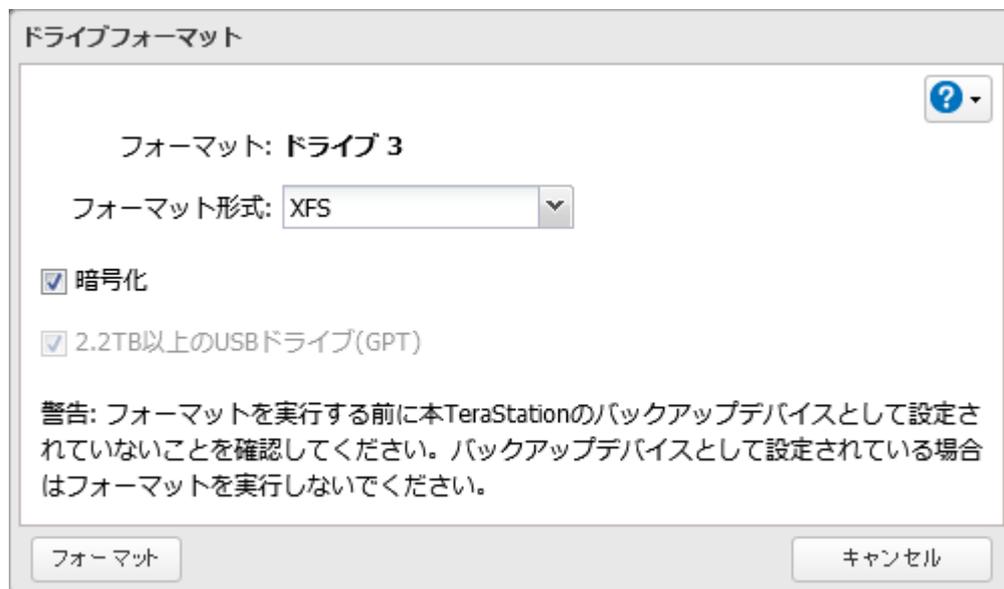
A screenshot of the 'ドライブフォーマット' (Drive Format) dialog box. The window title is 'ドライブフォーマット'. The main content area shows 'フォーマット: ドライブ 3' (Format: Drive 3). Below that is 'フォーマット形式: XFS' with a dropdown arrow. There are two checkboxes: the first is labeled '暗号化' (Encryption) and is checked; the second is labeled '2.2TB以上のUSBドライブ(GPT)' and is also checked. A warning message in Japanese states: '警告: フォーマットを実行する前に本TeraStationのバックアップデバイスとして設定されていないことを確認してください。バックアップデバイスとして設定されている場合はフォーマットを実行しないでください。' (Warning: Before executing format, please confirm that it is not set as a backup device of this TeraStation. If it is set as a backup device, do not execute format). At the bottom, there are two buttons: 'フォーマット' (Format) on the left and 'キャンセル' (Cancel) on the right. A help icon is visible in the top right corner.
暗号化したドライブを元に戻すには、「暗号化」のチェックマークを外してもう一度フォーマットしてください。
メモ:
- • 選択したドライブのデータ、共有フォルダーに関する設定がすべて消去されます。誤って実行しないようご注意ください。
- • 暗号化したRAIDアレイ/ドライブに対するアクセスはパフォーマンスが低下します。
- • USBドライブは暗号化できません。
- • フォーマット中は共有フォルダーを利用できません。
- • フォーマット中は電源を絶対にOFFにしないでください。