テクニカルサポートへの問い合わせ
運用や操作の不明点などを、サイボウズのテクニカルサポートに問い合わせます。

Warning icon: exclamation mark inside a triangle.
- ● テクニカルサポートへの問い合わせには、継続サービスライセンスが必要です。試用期間中、または継続サービスライセンスが有効なお客様のみ、テクニカルサポートに問い合わせできます。
- ● テクニカルサポートに問い合わせできるのは、システム管理者が「サポート登録者」に設定したユーザーだけです。
- ● テクニカルサポートに送信する情報は、「サポート登録者」が問い合わせ時に任意に設定できます。
- ● 「お客様情報」は、お問い合わせフォームに必要な情報を入力し、メールで問い合わせする場合にのみ、サポートセンターに送信されます。
サポート登録者を登録する
テクニカルサポートへ問い合わせを行うユーザーを、サポート登録者として登録します。
システム管理者や問い合わせの窓口となるユーザーをサポート登録者に設定することを推奨します。
サポート登録者は5名まで登録できます。
1. システム設定画面で、
 サポート登録者の登録
をクリックします。
サポート登録者の登録
をクリックします。

2. サポート登録者に設定するユーザーを選択し、 変更する をクリックします。
-
● サポート登録者に設定するユーザーにメールアドレスが登録されていない場合
サポート登録者に設定するユーザーはメールアドレスの登録が必要です。
ユーザー情報にメールアドレスが登録されていないユーザーを選択し ←追加 をクリックすると、メールアドレスの入力画面が表示されます。
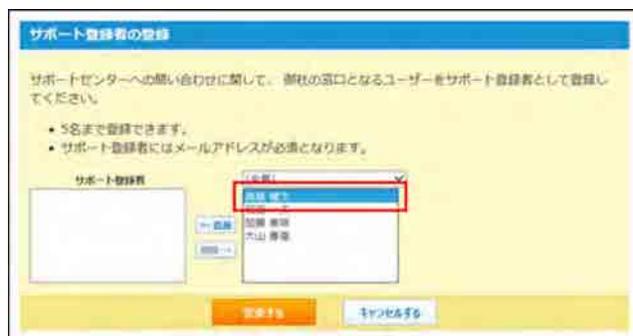
Screenshot of the 'Support Registration' dialog box. It shows a list of users on the left and a dropdown menu on the right with the option '変更する' (Change) highlighted by a red rectangle. Below the list are '登録する' (Register) and 'キャンセルする' (Cancel) buttons.

Blue downward arrow indicating the flow to the next step.
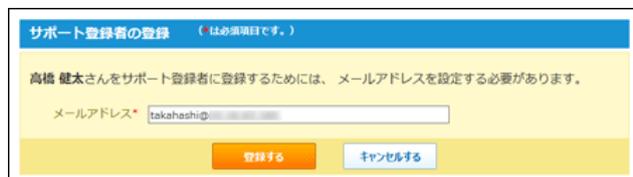
Screenshot of the 'Support Registration' input screen. It prompts the user to enter an email address for 'Takahashi Kenji'. Below the input field are '登録する' (Register) and 'キャンセルする' (Cancel) buttons.
メールアドレスを入力し、 登録する をクリックすると、サポート登録者として選択されます。