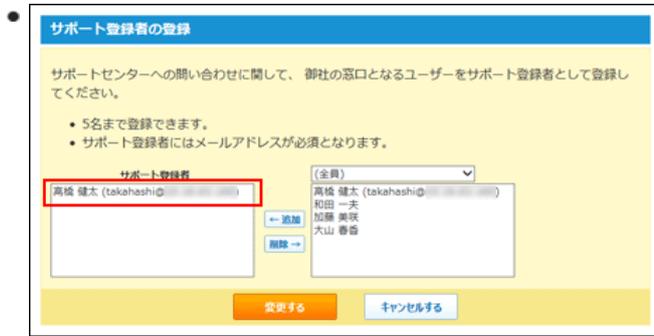
Screenshot of the 'Support Registration' dialog box. It shows a list of support registrants with 'takahashi@...' highlighted by a red box. A dropdown menu shows other potential registrants.

サポート登録者の登録

サポートセンターへの問い合わせに関して、御社の窓口となるユーザーをサポート登録者として登録してください。

  • 5名まで登録できます。
  • サポート登録者にはメールアドレスが必須となります。

サポート登録者

高橋 健太 (takahashi@...)

← 追加

削除 →

(全員)

高橋 健太 (takahashi@...)

和田 一夫

加藤 美咲

大山 春香

変更する キャンセルする

Screenshot of the 'Support Registration' dialog box. It shows a list of support registrants with 'takahashi@...' highlighted by a red box. A dropdown menu shows other potential registrants.

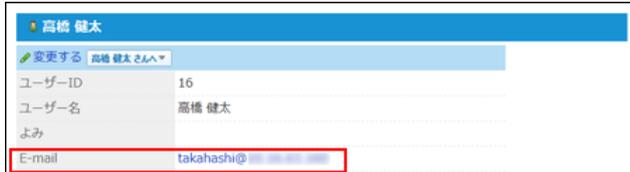
入力したメールアドレスは、ユーザー情報に反映されます。

Screenshot of the user profile for 'Takahashi Kenji'. The 'E-mail' field is highlighted with a red box.

高橋 健太

変更する 高橋 健太 さん ▼

ユーザーID 16

ユーザー名 高橋 健太

よみ

E-mail takahashi@... (redacted)

Screenshot of the user profile for 'Takahashi Kenji'. The 'E-mail' field is highlighted with a red box.

テクニカルサポートに問い合わせる

サポート登録者がテクニカルサポートに問い合わせます。

次の方法で問い合わせると、お客様の動作環境やネットワーク環境の情報を送信できるため、テクニカルサポートでより迅速に対応できます。

初めて問い合わせる場合

1. ヘッダーで、歯車アイコン>[お問い合わせ]の順にクリックします。

Screenshot of the header bar in the vbox Office10 application. The 'お問い合わせ' (Contact Us) link is highlighted with a red box.

▼vbox Office10

検索

アプリ一覧 リンク 高橋 健太

トップページ 個人フォルダ メール スクショール 共有予約 電話V(音声) タイムカード ToDoリスト

システム設定

管理者ヘルプ

お問い合わせ

Screenshot of the header bar in the vbox Office10 application. The 'お問い合わせ' (Contact Us) link is highlighted with a red box.

2. お客様情報を入力し、 変更する をクリックします。

テクニカルセンターへの送信を控えた情報は「送信しない」を選択します。